





Blogs
How to Launch a New Product On Amazon (the Right Way)
Instead of waiting until your product is struggling to turn to market research for enhancing listings, incorporating polls and testing early in the new product development stage can ensure that your products meet customers’ wants and needs before they ever make it to the digital shelf.
Whether you’re an experienced seller or launching your first product, having a solid Amazon product listing launch strategy is crucial to your success. With so many factors influencing a launch — timing, competition, and category — it’s vital to take the right steps to stand out and drive sales. Our guide will walk you through actionable steps to optimize your listing, get it noticed quickly, and maximize your chances of success in a crowded space. Let’s launch!
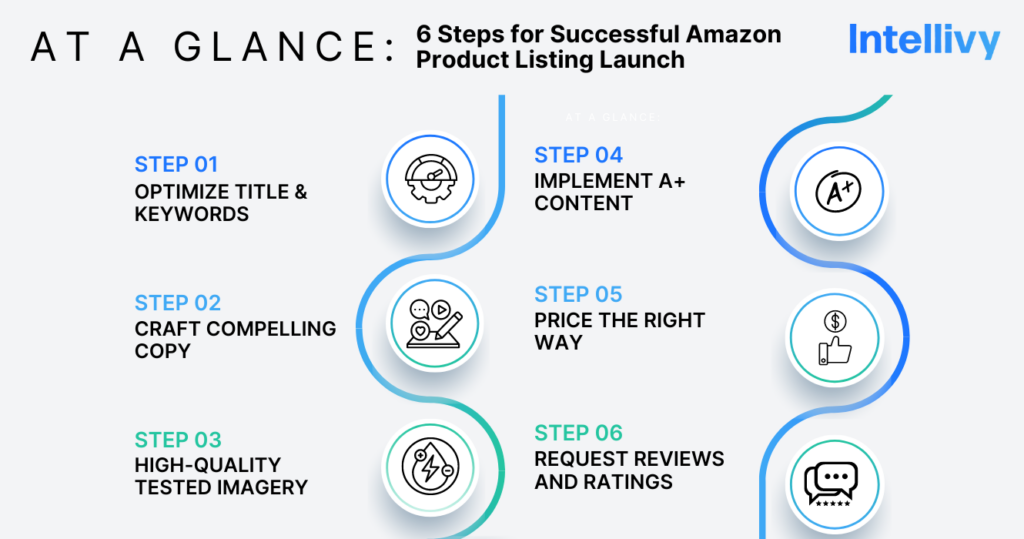
How to Optimize Your Amazon Product Listing Before Going Live
Step 1: Optimize Your Title and Keywords
Your title is one of the first things buyers see, especially in search results. Use tools like Helium 10, Ahrefs, and Jungle Scout to find top-performing keywords that are most relevant to your product listing. Keep your title between 150-200 characters and include important details like product type, size, color, and unique selling points.
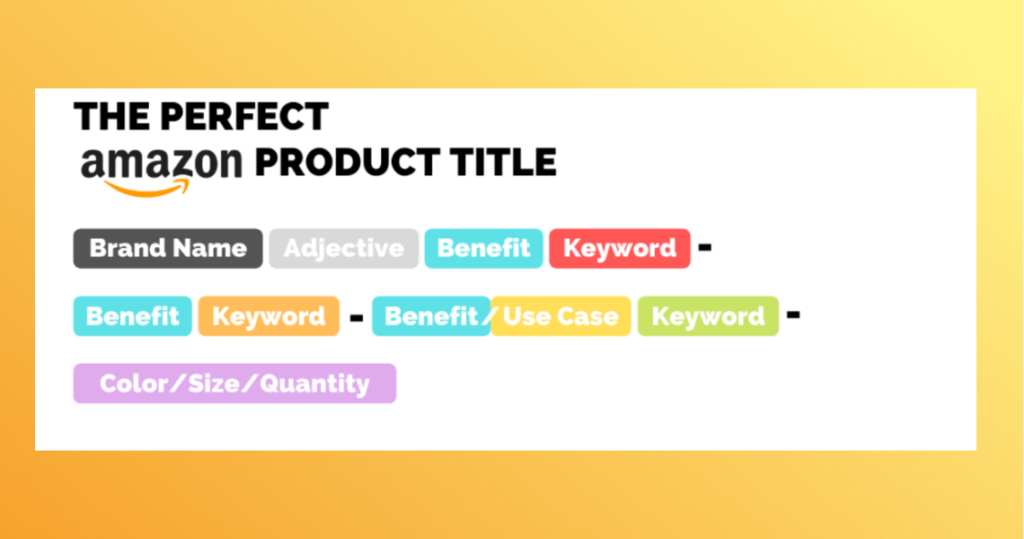
Example: Say you’re listing a shower liner – your optimized title may be ABC Curtain Plastic Shower Liner Clear – Waterproof, Lightweight, Standard Size Shower Curtains for Bathroom – Rust-proof, Easy to Clean. This title clearly explains what this product does, its top features, and also includes keywords that boost search visibility. Another great guideline to keep in mind is this title structure recommendation from Better World Products.
Step 2: Craft Compelling Copy
Using the keywords above, create bullet points that emphasize your product’s benefits and unique features. Focus on addressing customer pain points and explaining how your product solves them. Are there details that are especially important, like sizing or dimensions? Do you offer a warranty? The “About this item” section should be easy to read and answer common questions. Double check your points with Amazon’s Product Bullet Point Requirements.
Example:
- 100% Waterproof: Designed to repel water and dry quickly, keeping your bathroom clean and dry.
- Lightweight Design: Standard size at 72” length, perfect fit for most showers, with a lightweight structure for easy handling.
- Rust-Proof Grommets: Made with premium rust-resistant materials for long-lasting durability.
- Easy to Clean: Wipes clean effortlessly with just a damp cloth or mild soap.
- Versatile Use: Transparent and minimalist design fits any bathroom décor.
In your “Product Description” section, use longer-tailed keywords and elaborate on features, such as certifications, materials, or protections on purchases, for customers who want more information before making their buying decision. Even better, describe how to best use the product to really capture the best traffic for your Amazon product listing launch.
Step 3: Use High-Quality, Tested Imagery
Your image carousel should have at least six high-quality photos. We recommend using a variety of angles, close-ups that highlight certain features, and lifestyle photos that help customers see the purchase in action. Be sure to double-check Amazon’s image guidelines to ensure you’re setting yourself up for success.
Pro tip: Scroll down to learn more about Intellivy’s Image Stack Poll to test and optimize your images based on real consumer feedback.
Step 4: Implement A+ Content
If you’re Brand Registered, take full advantage of A+ Content to enhance your listing. It’s an ideal section for comparison charts, detailed descriptions, and overall engaging visuals to create a premium look that stands out among the competition. In fact, according to Amazon, well-executed A+ Content can increase sales by up to 20%.
Step 5: Price The Right Way
A 2021 survey found that 78% of consumers said price is the most important factor when it comes to buying decisions so it’s a component of your listing that can make or break a purchase. Research your competition and ensure your product is priced competitively. At launch, you can run discounts or coupons to boost sales velocity early on. Then, gradually adjust the price based on demand.
Step 6: Request Reviews and Ratings
Positive reviews can significantly boost your listing’s credibility. Use Amazon Vine to solicit reviews from trusted reviewers, and follow up with customers to encourage feedback. If you have an email or SMS list, this is a great resource to request feedback from prior purchases (or let them be the first to test your new one!). Remember, Amazon has strict guidelines on how you can request reviews so be sure to do your due diligence to remain in good standing. This document walks you through a high-level view of violation examples.
How to Get Your Amazon Product Listing Noticed Quickly
Now that you’ve tackled your checklist, the best way to get your Amazon product listing noticed quickly is by doing research beforehand to set yourself up for success. Gone are the days of guessing and making assumptions about consumer’s thoughts. That’s where Intellivy comes in. Our platform is designed to provide real, actionable insights from a pool of 55M+ consumers, helping you test and refine every part of your listing before going live. With Intellivy, you can develop a solid launch strategy built on data, not guesswork or intuition.
Here are some Intellivy polls that can help you launch with confidence:
Marketplace Poll
Test your product’s main image against competitors and discover what drives clicks. This poll gathers consumer feedback on elements like image, title, and star rating to help you optimize your product thumbnail, title, and more for higher clickthrough rates. By testing your product against competitors, you can tell what drives potential buyers to click.
Marketplace Poll SOP.
Purchase Barrier Poll
Identify potential objections that could discourage customers from buying your product. This poll helps you understand why consumers might hesitate and provides insights to counter those objections in your main image or title. You’ll have actionable feedback that will guide you in adjusting your main image, title, or description to address those concerns.
Purchase Barrier Poll SOP.
Image Stack Poll
Upload your top image choices to Intellivy’s Image Stack Poll to get feedback from real consumers. Choose the highest-rated image for your main listing photo to maximize click-through rates, and use others in your A+ content.
Image Stack Poll SOP.
Video Engagement Poll
This market research poll measures video engagement at three key points — 3 seconds, 8.25 seconds, and 30 seconds — to see where viewers drop off. Use that information to tweak your video and ensure your messaging is in the right place before you add it to your listing.
Confidently Launch Your Amazon Listing with Intellivy
For a successful Amazon product listing launch, you need to do more than just pressing “go live”. You need an optimized, well-researched approach that prioritizes visibility and conversion. Intellivy’s powerful data-driven tools will guide you in optimizing your listing, addressing consumer hesitations, and ensuring your product gets noticed quickly.
Ready to launch with confidence? Start using Intellivy today to fine-tune your product listing with consumer insights and perfect your Amazon listing for success.
Related articles
-
Blogs
9 Things Amazon Sellers Believe About Polling Platforms That Simply Aren’t True
We address all 9 of them directly. Because making listing decisions without real data is one of the most expensive things an Amazon seller can do.
Read more: 9 Things Amazon Sellers Believe About Polling Platforms That Simply Aren’t True -
Blogs
In-Home Product Testing: The Smarter Way to Launch Winning Products
Reduce risk and validate market fit with in-home usage testing. Learn how in-home product testing helps sellers launch with confidence.
Read more: In-Home Product Testing: The Smarter Way to Launch Winning Products -
Blogs
How to Know If You’re Priced Right on Amazon (and What to Do If You’re Not)
Use real consumer research for Amazon pricing strategies. The Intellivy Pricing Report helps Amazon sellers find their sweet spot for profit.
Read more: How to Know If You’re Priced Right on Amazon (and What to Do If You’re Not)